
Pandido Casino Login and Registration Guide
If you want to jump into slots, live casino, and sports betting without juggling multiple accounts, Pandido Casino keeps everything under one login. You sign up at Pandido Casino once, pick your welcome bonus, and get instant access to both the casino lobby and full sportsbook with a shared balance.
What to Expect When You Sign Up at Pandido
At Pandido Casino, you create a single account that works for casino games, live casino, jackpots, sports, live betting, and virtual sports. You see all sections in one clean sidebar, from Casino and Jackpots to Sports, Live Betting, Challenges, Tournaments, Bonus Crab, Shop, and VIP Levels.
You register once, choose your preferred welcome bonus type, and after that, the same login button in the Pandido Casino header gets you back into your account on any page. You can always switch between game categories and the sportsbook from the main navigation without logging in to Pandido Casino again.
How to Register at Pandido Casino
When you create an account at Pandido, the process is split into simple steps with a big focus on the welcome deal. You start by choosing a welcome bonus, then you fill in your Pandido Casino login details and accept the terms before moving on to deposits and gameplay.
Step 1 – Pick Your Welcome Bonus
On the very first registration screen, you see three main welcome options: Casino welcome 100% up to €500 + 200 free spins + 1 Bonus Crab, Sport first deposit bonus 100% up to €100, and Crypto welcomes like 200% up to 3,000 USDT for casino or 100% up to 200 USDT for sport. You can also tick “I have a promocode” or choose “I do not want a Welcome Bonus” if you prefer to start without any offer.
You simply click on the tile that matches how you want to play, for example, Casino if you love slots, Sport if you are here for bets, or Crypto if you plan to deposit in coins. After that, you hit “Choose”, and the site takes you to the account details form as the next step of registration.
Welcome bonus choices at Pandido Casino sign-up:
| Option | Vertical | Main perk at registration |
| Casino | Casino | 100% up to €500 + 200 FS + 1 Bonus Crab |
| Sport | Sports | 100% up to €100 on first deposit |
| Crypto (casino) | Casino | 200% up to 3,000 USDT equivalent in crypto |
| Crypto (sport) | Sports | 100% up to 200 USDT sports bonus |
| No bonus | Any | Play with real money only, no rollover to track |
If you are not sure which one to pick, remember that you can always skip the bonus now and grab other promotions, reloads, and shop rewards later in your profile.
Step 2 – Create Your Account
On the second step, you create your actual login for Pandido Casino. You enter your e‑mail, choose a strong password, and tick the box confirming you are at least 18 and you accept the Terms & Conditions and Privacy Notice before you can continue.
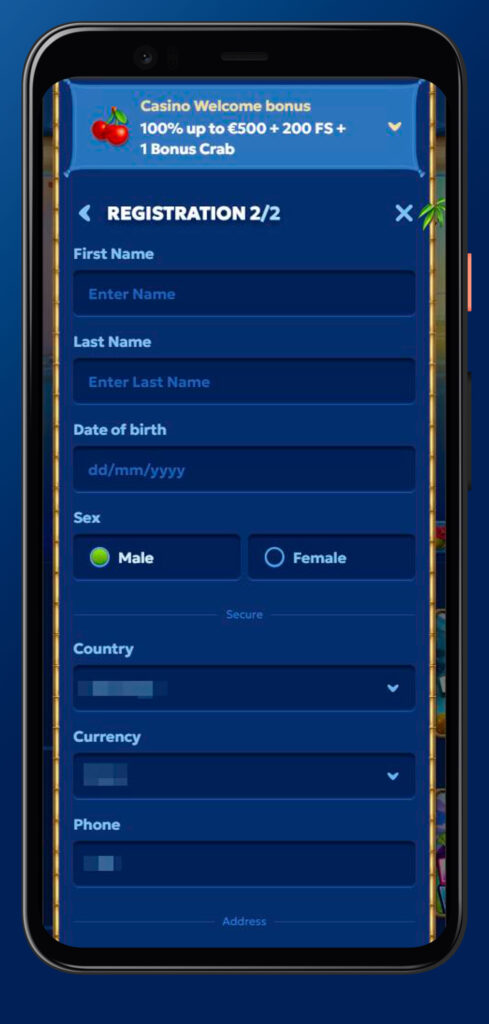
There is also a separate checkbox if you want to receive bonuses, promotions, news, and other info through different communication channels, which you can untick if you prefer a quieter inbox. When everything is filled, you hit “Next step”, and from there you can head straight to deposit, claim the selected welcome bonus from “My Bonus” in your profile, and start playing.
How to Log In to Pandido Casino
Now, once you have an account, logging back into Pandido is just a couple of clicks. The “Log in” button is always visible in the header on desktop and mobile, so you can jump in from any page.
Desktop Login
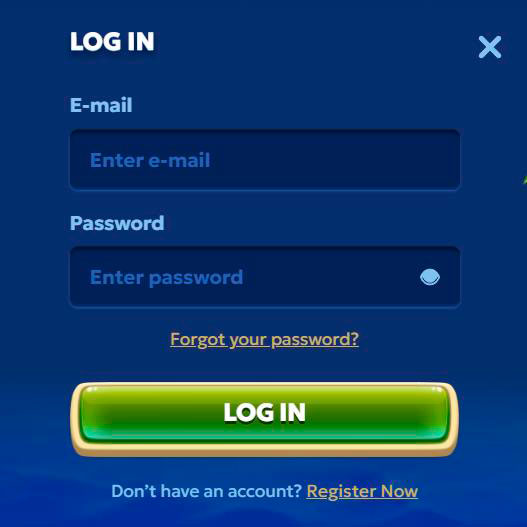
On the desktop, you visit Pandido Casino, then click the “Log in” button in the top navigation bar next to “Register”. A pop-up appears where you type the e‑mail and password you used at registration and confirm.
If you have any trouble logging in, you can open the Help Centre from the footer or contact Live Chat from the bottom bar to double‑check your details or reset access. You should always keep the browser logged out on shared computers once you finish your session, just to keep your balance safe.
Mobile Login via the Pandido Shortcut
On mobile, you use the same credentials, but Pandido also offers a special “Create Shortcut” option to pin the casino as an app‑style icon on your home screen. You can find this via the “Create Shortcut” link in the footer under General Info.
Once you add the shortcut, you just tap the Pandido icon on your phone, and the site opens in a full‑screen view where you hit “Log in” and enter your e‑mail and password. This way you get that native‑app feel without installing anything from a store.
Account Security and Access Rules
We take your account access seriously, so you’ll want to treat your login details like your wallet. There are also clear rules about how many accounts you can have on Pandido.
Password and Credential Management
When you register at Pandido Casino, you pick a password that only you know, and that you’ll need every time you log in from a new browser or device. You should avoid sharing this password with anyone, reusing passwords from other sites or storing them in plain text.
If you forget your login details or suspect someone else has access, you can reach out to Live Chat or email support to help secure the account and update your password. Support may ask for ID and other proof before they change any sensitive data, just to be sure they are talking to the right person.
One Account Policy and Duplicate Account Rules
Pandido clearly states that no bettor can have more than one account. Accounts created with different credit cards, IP addresses, or household addresses to bypass this rule are not allowed to claim bonuses.
If the casino detects that a player has more than one account, it reserves the right to take action it considers appropriate, which can include removing bonuses or closing extra profiles. That is why you should stick to a single account under your real data and contact support instead of opening a duplicate if you have login problems.
Identity Verification at Pandido (KYC)
At some point, Pandido Casino will likely ask you to pass the verification, especially before bigger withdrawals or when you claim bonuses. This is standard KYC procedure for licensed casinos and helps keep everything compliant and safe.
What Documents Are Required
The general terms say that the casino can request “sufficient and satisfactory documentation” to verify your customer information. This usually includes an ID document, a proof of address, and sometimes proof of payment method.
You can expect to be asked for a copy of your passport or ID card, a recent utility bill or bank statement showing your address, and screenshots or statements for cards or wallets you used to deposit. All of this is used only to confirm you are who you say you are before bonuses are credited or withdrawals are processed.
When Verification Is Requested
Pandido reserves the right to request these documents before crediting a bonus or processing a withdrawal of winnings derived from gameplay with a bonus. In other words, you might see a Pandido Casino verification request right after big wins or when you try to cash out.
You may also see KYC prompts when your activity triggers internal checks, such as frequent deposits from new methods or reaching certain cumulative limits. The faster you upload the requested files, the quicker support can clear your account for smooth withdrawals.
Account Management and Closure
If you ever feel like taking a break or calling it a day completely, Pandido gives you options to manage or close your account. You should always aim to do this with a zero balance so you do not leave any funds stuck.
You can request self‑exclusion or permanent closure by emailing support at support@pandido.com with your account details and what exactly you want done. Once your balance is at €0 and any pending withdrawals are handled, the team can lock or close your account as requested according to responsible gaming guidelines.
Conclusion
Bottom line, registering and logging in at Pandido Casino is quick, but you still get all the serious stuff like one‑account rules, KYC checks, and clear closure options behind the scenes. You pick your welcome bonus up front, keep your login details safe, and you are set to enjoy casino games and sports betting from the same profile.

Frequently Asked Questions
Yes, one Pandido account gives you access to casino, live casino, jackpots, sports, live betting, and virtual sports with a single balance.
You choose your welcome type on the first step, and the welcome bonus must be claimed before any bets with the qualifying deposit, so you cannot swap once you start betting with it.
You open Pandido in your mobile browser, tap “Log in” and enter the same e‑mail and password as on desktop, or use the “Create Shortcut” option to pin a quick‑access icon to your home screen.
The casino may request ID, proof of address, and proof of payment before crediting bonuses or processing withdrawals, especially after larger wins or bonus play.
You contact support via Live Chat or email support@pandido.com, make sure your balance is zero, and request self‑exclusion or permanent closure according to the policy.